
What to do when you want to report any issue or raise Service request via Noventiq Support Portal.
-
In your Noventiq Support account, navigate to the Tickets module in left menu ( https://support.noventiq.com/tickets/create)

Use button “+ Create ticket”
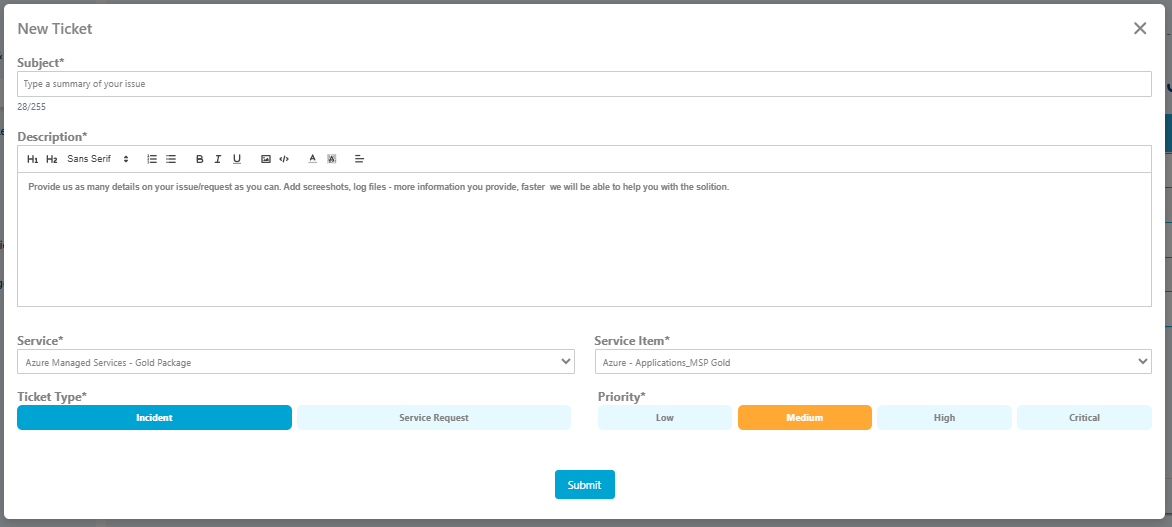
Enter your ticket details. The following fields are required:
-
Under Subject, type the essence for the issue you're having
-
Under Description, provide any additional information that will help the Support team troubleshoot the problem. Helpful information may include:
-
Steps to reproduce the issue
-
Any special circumstances surrounding the discovery of the issue (for example, the first occurrence or occurrence after a specific event, frequency of occurrence, business impact of the problem and suggested urgency)
-
Exact wording of error messages
-
-
Under Service, select your service package
-
Under Service Item select item most relevant to your issue/request
-
Under Priority, choose a specific priority, more details about the Priority: Priorities Definitions
-
Under Ticket type, choose a specific type of ticket, more details about the Ticket type: Incident vs Service Request
-
Attach the file if necessary
Click Submit
Noventiq Support